Online Casino Login Problems: Fixes for Common Sign-In Issues

Online casino login problems waste time and block deposits, withdrawals, and play. Most sign-in failures come from a few repeat causes, wrong credentials, expired sessions, 2FA issues, browser settings, IP or device blocks, and account restrictions.
This guide shows you how to fix the most common login errors fast. You will learn how to reset your password the right way, clear cache and cookies without losing access, handle SMS or app codes, check if your casino site is down, and spot when KYC or responsible gambling limits locked your account. You will also learn what details to send to support so they can verify you and restore access with fewer back-and-forth messages.
- In het kort: Check the basics first, username, password, and the right site or app.
- Reset your password from the official login page. Avoid saved links from emails or ads.
- Clear cache and cookies for the casino domain. Then restart your browser or app.
- Fix 2FA fast. Sync your phone time for authenticator apps, request a new SMS code, and check signal and roaming limits.
- Rule out outages. Try another device, another network, and the casino status page if available.
- Expect locks from KYC checks, responsible gambling limits, or too many failed attempts. These need support or verification steps.
- Send support the right details, email or username, device, browser or app version, exact error text, time of attempt, and screenshots.
- Protect your account. Use a unique password and avoid public Wi-Fi. Review secure funding steps in online casino payment safety tips.
What counts as an online casino login problem (and why it happens)
What counts as an online casino login problem
A login problem is any issue that stops you from reaching your account dashboard after you enter your details. Some failures happen before password checks. Others happen after the casino accepts your password but blocks access.
Most issues fall into four buckets, credentials, device or browser, network, or account status. You fix the first three fast. Account status blocks usually need verification or support.
Common symptoms you will see
- Error codes and messages. Examples include “Invalid username or password,” “Account locked,” “Access denied,” “Too many attempts,” and generic “Something went wrong.”
- Endless loading. The login button spins, the page reloads, or you loop back to the sign-in screen after entering correct details.
- Blocked access. You get a “restricted country,” “service unavailable,” or “this browser is not supported” message. You may also get blocked on one device but not another.
- Missing 2FA prompt. You never receive a code, the authenticator prompt does not show, or the SMS or email arrives late and expires.
Why it happens, the main root-cause categories
- User error. Wrong email, wrong password, saved autofill using an old password, caps lock, extra spaces, or you signed up with a different method such as Google, Apple, or a phone number.
- Device and browser issues. Outdated app or browser, corrupted cookies, blocked JavaScript, aggressive ad blockers, private mode restrictions, or a VPN or proxy that breaks session checks.
- Network problems. Weak mobile signal, captive Wi-Fi portals, DNS issues, corporate firewalls, or ISP blocks. Some casino security tools also flag shared networks.
- Platform outage. Casino maintenance, authentication service downtime, payment provider downtime affecting login, or regional service disruption. These often create endless loading or generic errors.
- Account status restrictions. KYC review, age or identity mismatch, responsible gambling timeouts, self-exclusion, chargeback or fraud flags, geolocation failure, or lockouts after repeated failed attempts. For KYC-related blocks, see KYC verification rules.
Quick fix vs account-level restriction
| What you notice | Most likely cause | What it means for you |
|---|---|---|
| “Invalid password,” autofill fails, caps lock issues | User error | Quick fix. Reset password, retype credentials, check signup method. |
| Endless loading, page refresh loop, login works on another browser | Cookies, cache, extensions, outdated browser | Quick fix. Clear site data, disable blockers, update app or browser. |
| Works on mobile data but not Wi-Fi, or only fails on work network | Network or firewall | Quick fix. Switch networks, disable VPN, restart router, change DNS. |
| Many users report the same issue at the same time | Platform outage | Wait and retry. Do not spam login attempts. |
| “Account locked,” “verification required,” “access restricted,” 2FA forced but fails | Account status restriction | Not a quick fix. You need support, verification, or a cooling-off period to end. |
Fast checks before deeper troubleshooting
Confirm the correct site or app
Start with the basics. Many login failures come from using the wrong address, the wrong app, or a fake copy.
- Use the official URL. Type it yourself or use a trusted bookmark. Avoid random links in emails, ads, and popups.
- Watch for mirror sites. Some casinos use alternate domains during ISP blocks or regional routing issues. Use mirrors only if the casino lists them in its help center or official social accounts.
- Spot phishing lookalikes. Check the domain letter by letter. Look for small changes like extra words, swapped letters, or different endings like .net instead of .com.
- Confirm the app source. Install only from the official app store listing or the casino’s own download page. Avoid APK files from forums and file hosts.
Check for outages and maintenance
If your login stops working with no changes on your side, the platform may have a service issue.
- Status pages. Check the casino’s status page if it has one. Look for notes on login, payments, KYC, or geolocation checks.
- Social channels. Scan recent posts and replies. Casinos often acknowledge downtime faster on X, Telegram, or Facebook than on-site.
- Third-party monitors. Use a site monitor like Downdetector to confirm reports from other users. Focus on spikes in the last hour.
- Do not spam login attempts. Repeated failures can trigger lockouts, CAPTCHA loops, or extra verification.
Try another device or connection to isolate the cause
This step tells you if the problem sits on your device, your network, or the casino’s side.
- Switch devices. Try your phone if your laptop fails, or your laptop if the app fails. If one works, the issue likely sits in the other device’s browser, app cache, or settings.
- Switch browsers. Test Chrome, Safari, Firefox, or Edge. This helps rule out extension conflicts and cookie issues.
- Switch connections. Move from Wi-Fi to mobile data, or use a different Wi-Fi network. If mobile data works but Wi-Fi fails, your ISP, router, or DNS may block or misroute the domain.
- Test private mode. Incognito mode runs with fewer stored cookies and extensions. If it works, clear site cookies and cache in your normal browser.
Credential and password issues (most common fixes)
Username and email mix-ups
Many casinos accept one identifier only. Some use your email. Others use a username, phone number, or player ID. If you enter the wrong type, the password can still be correct and you will still fail login.
- Check the field label. If it says “Email,” use the exact email you registered, not a username.
- Search your inbox. Find the casino’s welcome email or KYC email. It usually shows the registered email, username, or player ID.
- Try your common variants. You may have used a different email, plus-alias, or domain, for example gmail.com vs googlemail.com.
- Avoid copy mistakes. Remove spaces before or after the email. One trailing space breaks login on many sites.
Caps Lock, keyboard layout, and autofill problems
Small input errors cause most “wrong password” messages. Fix your inputs before you reset.
- Turn off Caps Lock. Passwords are case sensitive. Some usernames are, too.
- Check keyboard layout. QWERTY vs AZERTY changes characters. So does a mobile keyboard with another language enabled.
- Retype both fields. Do not trust autofill. Password managers can fill an old password or the wrong site entry.
- Show password. If the site offers an eye icon, use it. Look for swapped characters like O and 0, l and 1.
- Disable auto-correct on mobile. Some keyboards alter emails and usernames.
- Paste carefully. Copying from notes can add hidden spaces or line breaks. Paste into a plain text app first, then copy again.
Password reset best practices
Reset only after you confirm the identifier and input are correct. Too many resets can trigger fraud checks on some casinos.
- Use the official reset link. Open the casino site directly, then use “Forgot password.” Avoid reset links from ads or forwarded messages.
- Check the right inbox. Look in Spam and Promotions. Also search for the casino name, “reset,” and “security.”
- Act fast. Reset links often expire within 10 to 30 minutes. Request a new one if it fails.
- Use one reset at a time. Multiple requests can invalidate earlier emails. Use the most recent link only.
- Create a strong unique password. Use 12 to 16+ characters. Mix words and symbols, or use a password manager to generate one.
- Update your password manager entry. Save the new password immediately. Old saved passwords create repeat lockouts.
Account lock after too many attempts
Casinos often lock accounts after repeated failures. This prevents brute-force attacks and stops fraud.
- Stop guessing. Each attempt can extend the lock window.
- Wait before retrying. Give it at least 15 minutes, then try once with verified credentials.
- Do one clean attempt. Close the login page, reopen it, then type the identifier and password manually.
- Use password reset instead of retries. If you are not sure, reset once, then log in once.
- Contact support if the lock persists. Ask for the lock duration and whether they need ID verification to unlock it.
Two-factor authentication (2FA) and verification problems
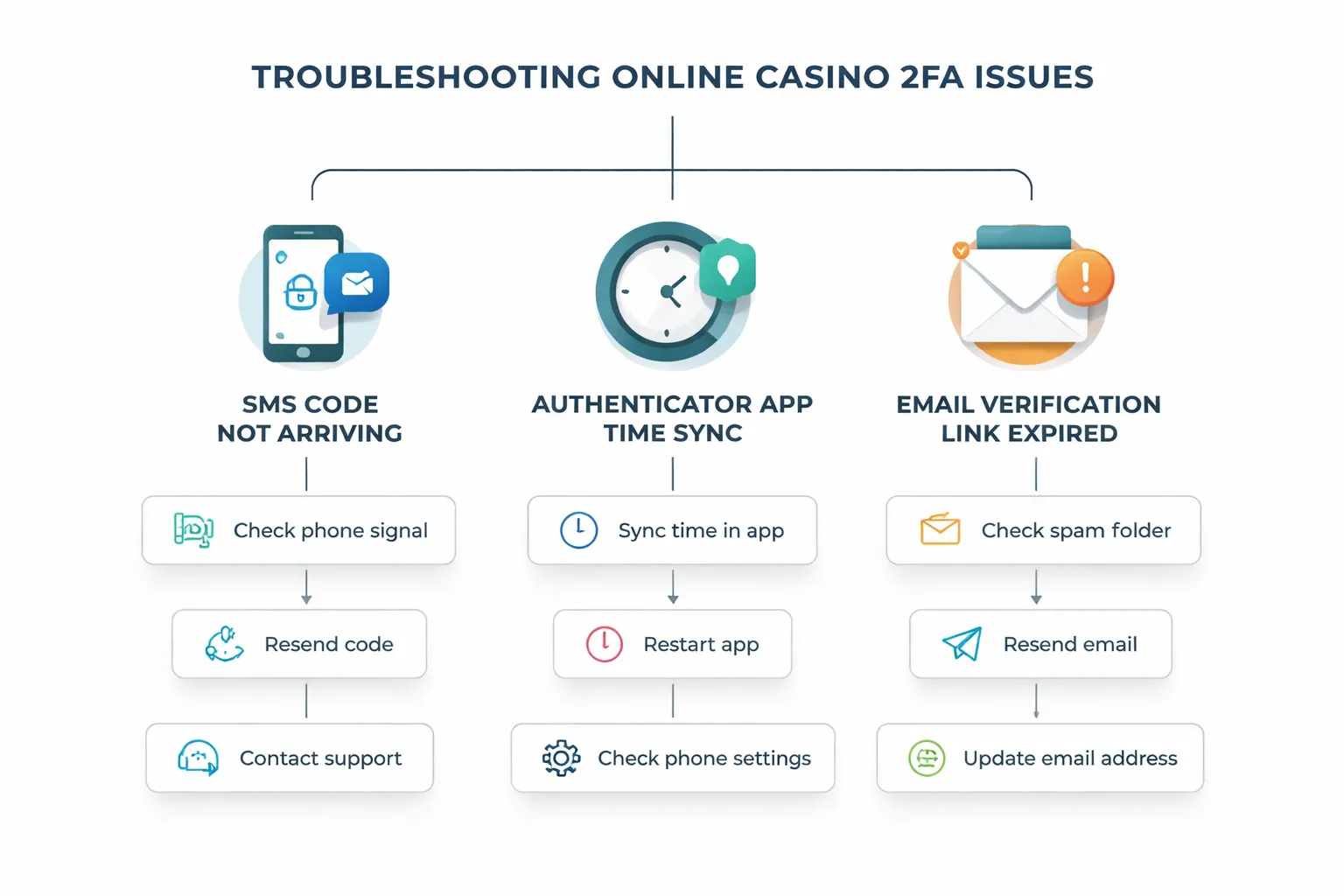
SMS codes not arriving
SMS 2FA fails for four main reasons, carrier filtering, short code blocks, roaming, and delivery delays. Fix the basics first, then escalate.
- Check the number format. Use the full international format, plus country code. Remove leading zeros.
- Wait for delay, then request once. Carriers can queue short code SMS for several minutes. Do not spam requests, you can trigger rate limits.
- Turn off spam and unknown sender filters. Some phones auto-filter short codes into a hidden inbox.
- Watch for short code blocks. Many carriers block premium and short code traffic by default. Ask your carrier to allow short codes for your line.
- Roaming can break delivery. If you travel, switch to a local SIM or use Wi-Fi calling if your carrier supports it.
- Check signal and SMS settings. Weak signal, SMS disabled, or missing carrier settings can stop codes.
- Use another 2FA method if offered. Switch to an authenticator app or email codes while you fix SMS.
- Contact support with specifics. Share your country, carrier, and the time window of failed sends. Ask if they use short codes or long numbers, some countries block one type.
| Symptom | Likely cause | Fast fix |
|---|---|---|
| No code at all | Short code blocked by carrier | Ask carrier to enable short codes, then request one new code |
| Codes arrive late | Carrier queue or network congestion | Wait 5 to 10 minutes, request once, do not retry rapidly |
| Works at home, fails abroad | Roaming restrictions | Use authenticator or email, replace SIM, or disable roaming blocks |
Authenticator app desync
Authenticator codes fail when the app time drifts from real time. Small drift can break TOTP codes.
- Fix time sync on your phone. Enable automatic date and time, and automatic time zone. Then close and reopen the authenticator app.
- Try the next code. Wait for the 30-second cycle to roll over, then enter the next code. Type it fast.
- Use backup codes. If you saved backup codes, use one to log in. Then replace them with new ones inside security settings.
- Re-enroll 2FA if you changed phones. Log in using backup codes or an alternate method, disable 2FA, then set it up again from scratch.
- Do not copy old QR codes. Old QR images can generate codes that never match. Always scan a fresh QR from the account security page.
- Store recovery details safely. Save backup codes offline. Screenshot storage in cloud albums can expose them.
If the casino asks for extra checks during re-enrollment, complete them first. Many sites require email or ID verification before they let you change security settings. Use the same identity details you used when you created the account, see sign up and create an online casino account if you need to confirm what you entered.
Email verification links not working
Email verification often fails because the token expires, the email lands in spam, or your email client rewrites the link.
- Check expiration. Many verification links expire in minutes or hours. Request a new email, then click the newest link only.
- Open the link in a normal browser. Some in-app email browsers break redirects. Copy the full link and paste it into Chrome, Safari, or Firefox.
- Search spam and promotions. Check Spam, Junk, Promotions, and All Mail. Move the email to inbox to train the filter.
- Add the sender to safe senders. Whitelist the casino domain in your email settings. This reduces future filtering.
- Avoid VPN and aggressive ad blockers for the click. Some security links reject high-risk IPs or blocked scripts. Disable them for one attempt.
- Do not forward the verification email. Some systems bind tokens to session and device. Use the original inbox and device when possible.
If the link still fails, contact support and ask them to manually verify your email, or to send a fresh link with a longer expiry window.
Browser fixes for desktop login errors
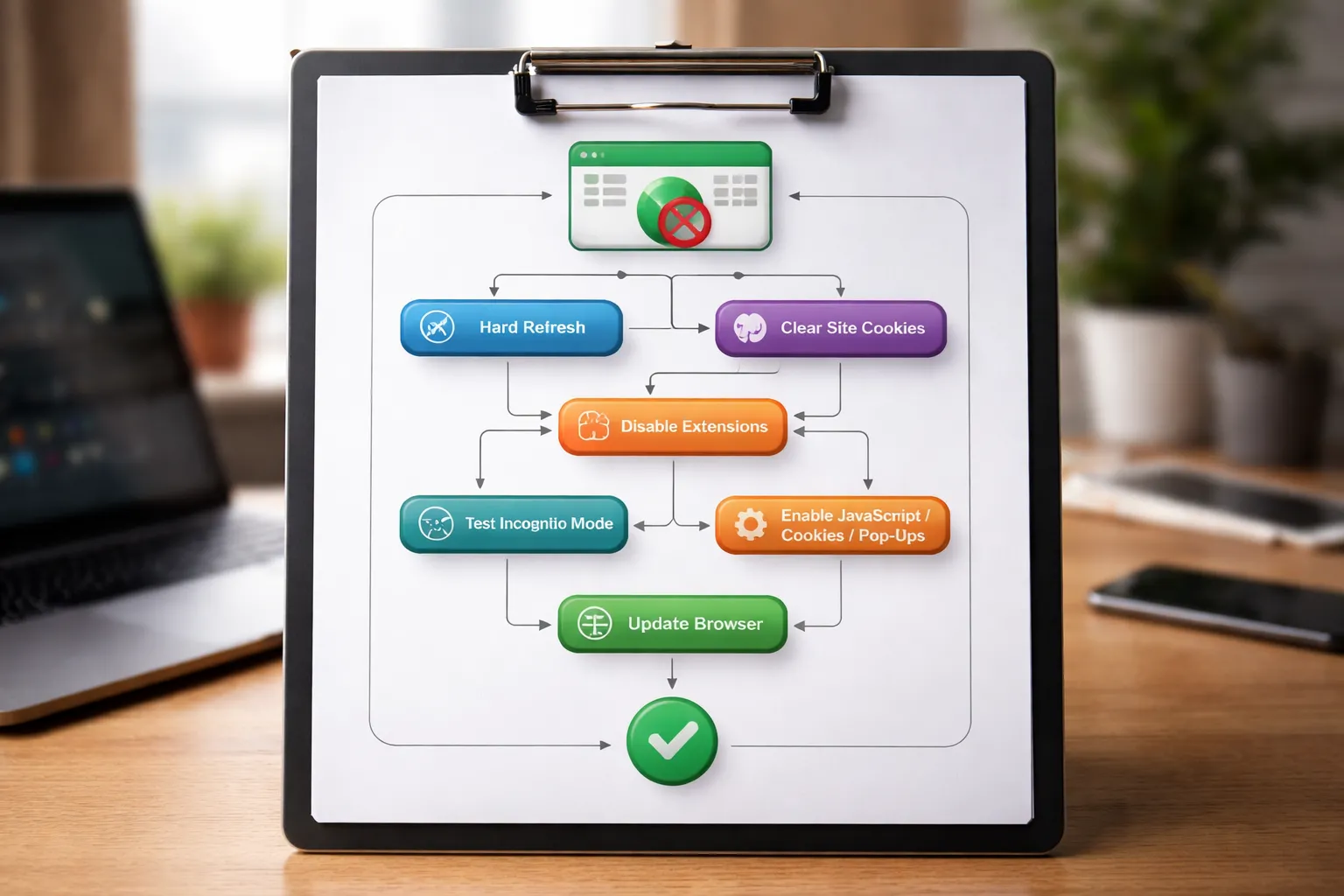
Clear cookies and cache the right way
Bad or stale site data can break your login session. Start small. Escalate only if needed.
- Step 1, reload first: Hard refresh the page. On Windows, press Ctrl + F5. On Mac, press Cmd + Shift + R.
- Step 2, delete site data only: Clear cookies and site data for the casino domain, not your whole browser. This removes broken session cookies without logging you out everywhere.
- Step 3, clear cache if pages look wrong: Clear cached images and files. Do this if the login page loads with missing buttons, blank panels, or stuck spinners.
- When to clear everything: Use full browser data clearing only if multiple sites fail to sign in, or if site-only clearing did not work after a full browser restart.
Disable extensions that break login
Extensions often block scripts that handle authentication. Test with extensions off, then turn them back on one at a time.
- Ad blockers: Disable for one attempt, or add the casino to your allowlist. Some login forms and CAPTCHA tools load from ad network domains.
- Script blockers and privacy tools: Turn off NoScript style tools, tracker blockers, and strict anti-fingerprinting modes. They can block JavaScript, third-party cookies, and local storage.
- Password managers: Disable auto-fill for the site. Wrong field mapping can submit the wrong username, hidden spaces, or old passwords.
- VPN add-ons and proxy switchers: Disable browser-level VPN extensions. They can trigger risk checks, change IP mid-session, or block geolocation requirements.
- Security extensions: Web filters and antivirus add-ons can rewrite pages and strip scripts. Pause them for one login attempt.
Use private mode to isolate cookie and session conflicts
Private mode runs with a clean cookie jar and minimal extensions. It helps you confirm a browser-side issue fast.
- Open an Incognito or Private window.
- Try logging in once. Do not open multiple casino tabs during the test.
- If private mode works: Your normal profile likely has a cookie conflict, broken cached files, or an extension problem. Clear site data for the casino, then re-enable extensions one by one to find the culprit.
- If private mode fails too: Focus on browser settings, network, or account-side checks.
Update your browser and enable required settings
Casinos rely on modern encryption and script-driven login flows. Old browsers and blocked settings cause hard failures.
- Update the browser: Install the latest version of Chrome, Edge, Firefox, or Safari. Restart after updating.
- Enable JavaScript: Login forms, CAPTCHA, and token redirects need it. If JavaScript is off, the page may load but the sign-in button will not work.
- Allow cookies: Enable first-party cookies. If the casino uses an identity provider, you may need to allow third-party cookies for that domain pair during login.
- Allow pop-ups and redirects for the casino: Many sites use a short pop-up or new tab for verification, 2FA, or payment wallet confirmation.
- Check time and date: Fix your system clock if it is wrong. Auth tokens can fail when device time drifts.
Mobile app sign-in issues (iOS/Android)
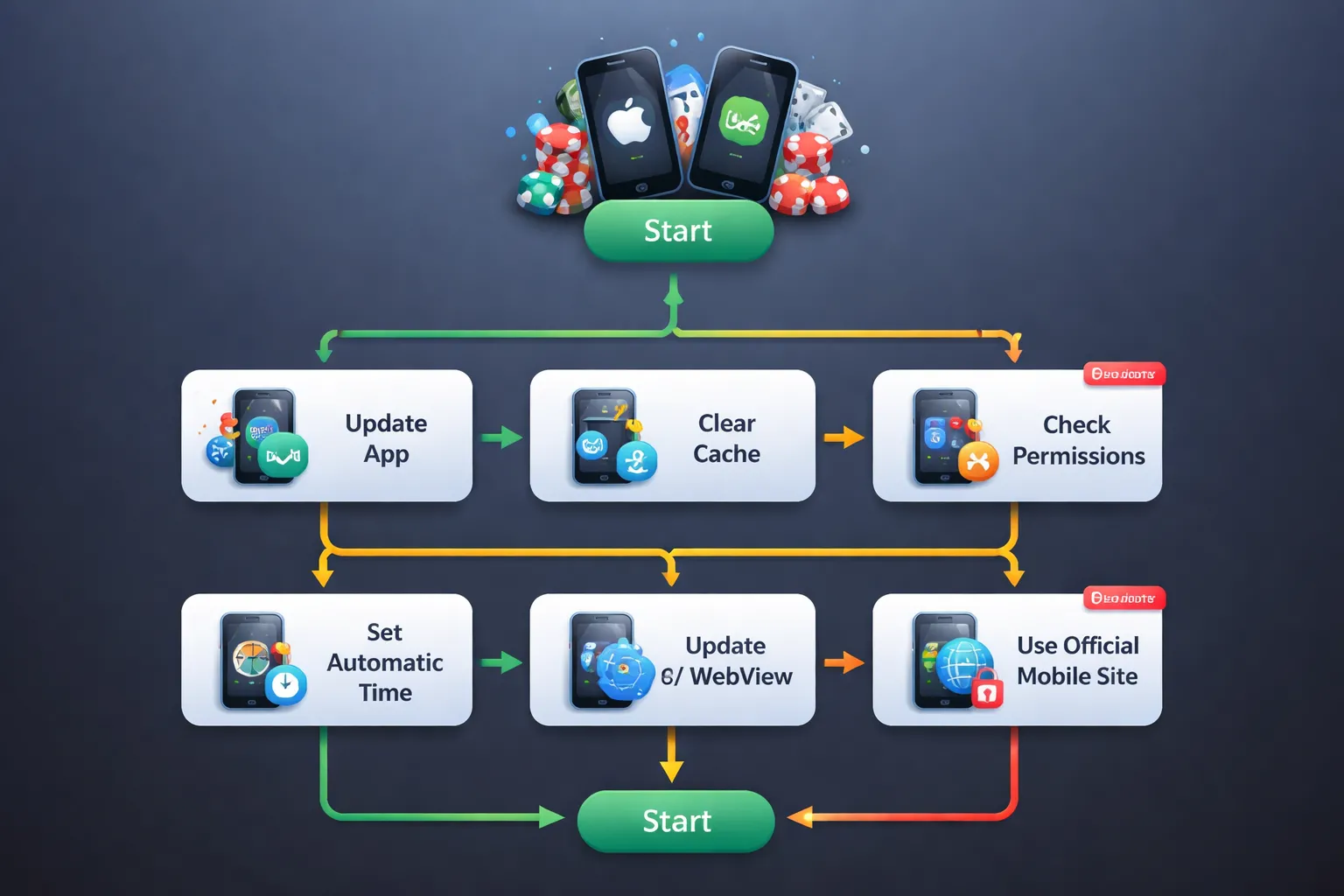
Update or reinstall without losing access
Start with the lowest-risk reset. Do this in order.
- Check service status: Look for a maintenance banner in the app or on the casino site. If logins fail across devices, wait and retry later.
- Force close and relaunch: iOS, swipe the app away. Android, open App info, tap Force stop.
- Update the app: Open the App Store or Google Play, update the casino app and any linked wallet or ID app it launches during login.
- Disable VPN or ad blockers: VPNs and DNS blockers can break token exchange and verification redirects.
- Clear cache (Android): Settings, Apps, the casino app, Storage, Clear cache. If needed, Clear storage. This can sign you out.
- Offload or reinstall (iOS): Settings, General, iPhone Storage, casino app, Offload App. Reinstall after offload. If you delete the app, you remove local data.
- Before you reinstall: Confirm you can receive 2FA codes. Update your email and phone in your account first if you still have access.
- After reinstall: Log in on stable Wi-Fi. Complete 2FA. Finish any identity checks if prompted. Use the same email, username, and method you originally used.
App permissions that affect login
Permissions do not just enable features. They can block sign-in flows.
- Notifications: Some apps send sign-in approvals or security alerts as push prompts. Enable notifications for the casino app.
- SMS: If the casino uses SMS 2FA, you must have signal and the ability to receive texts. On Android, allow SMS permission only if the app reads codes automatically. If you deny it, you can still type the code manually.
- Storage and cache: On Android, storage access can affect saved session files. If you clear storage, expect a full logout and a fresh device check.
- Camera: Needed for QR-based login and document scans. If you hit verification during login, you may need camera access. Use the browser route if you prefer manual upload. See how to verify your identity.
- Network access: Disable Data Saver and battery restrictions for the app. Background restrictions can interrupt token refresh and cause repeated login loops.
Time, date, and OS updates that break authentication
Most casino apps rely on short-lived tokens. Bad device time can make tokens look expired.
- Set time to automatic: iOS, Settings, General, Date & Time, Set Automatically. Android, Settings, System, Date & time, Use network-provided time.
- Set time zone to automatic: Wrong time zone can fail the same checks as wrong time.
- Update iOS or Android: Older OS builds can break modern TLS and WebView flows used during login and 2FA.
- Update WebView (Android): In Google Play, update Android System WebView and Chrome. Many in-app login pages run inside WebView.
- Restart after updates: A reboot resets network stacks and clears stuck background services that can block sign-in.
App blocked in your region
Some regions block the app listing, the casino domain, or both. Use official paths only.
- Use the official mobile site: Open the casino URL in Safari or Chrome. This avoids store restrictions and app-level blocks.
- Use the casino-approved mirror domain: Some operators provide alternate domains for regional routing. Get the link from the casino help center or verified emails only.
- Use the official app store listing for your region: Avoid APKs from forums and file sites. Sideloaded apps often contain malware or steal credentials.
- Check local rules: If the operator does not license your location, you may get blocked at login even with correct details. The only fix is to use a legal, licensed option in your region.
- Contact support with specifics: Share your OS version, app version, network type, error text, and your region. Ask if they have an approved access method for your location.
Network, VPN, and location-based blocks
Geolocation checks and travel blocks
Many casinos check your location at login. They use your IP address, GPS, and Wi-Fi positioning. If these signals do not match, they can block access.
- Travel can trigger a lock. A new country or state can sit outside the operator’s license. You will see “service not available in your region” or a generic login error.
- Cross-border networks cause mismatches. Mobile carriers can route traffic through a different region. Your IP can show the wrong place.
- App permissions matter. If you deny location permission, some apps fail geolocation checks and stop at sign-in.
- Fix: Turn on Location Services. Allow the casino app to access location while using the app.
- Fix: Turn off mock location tools. Turn off developer options that spoof GPS.
- Fix: Switch between Wi-Fi and mobile data. Recheck if your IP resolves to the correct region.
- Fix: If you are in an unsupported region, use a legal, licensed casino for that location. Do not try to bypass the block.
VPN and proxy detection
Casinos flag VPNs, proxies, and some privacy relays. They treat them as fraud risk. They block login or force extra checks.
- Common triggers: VPN on your phone or computer, corporate VPN, iCloud Private Relay, proxy browser extensions, “secure DNS” apps that tunnel traffic.
- What it looks like: endless loading, “access denied,” repeated password prompts, sudden 2FA loops, or “suspicious activity” notices.
- Fix: Disable your VPN and proxy extensions. Close the app or browser. Reopen and log in.
- Fix: Turn off iCloud Private Relay if you use Safari.
- Fix: If you must use a work VPN, switch to a personal network. Do not use split tunneling as a workaround, many systems still detect it.
- Fix: If the site keeps flagging you, contact support and ask if your IP range got blocked.
DNS and connectivity fixes
Bad DNS or unstable routing can break sign-in. The page loads, but the login request fails.
- Switch networks: Try mobile data if Wi-Fi fails. Try Wi-Fi if mobile data fails.
- Restart hardware: Reboot your router and modem. Power off for 30 seconds.
- Flush DNS cache: Restart your device. This clears many cached lookup issues.
- Try public DNS: Use 1.1.1.1 or 8.8.8.8 if your ISP DNS times out or blocks domains.
| Fix | When to use it |
|---|---|
| Switch Wi-Fi to mobile data | Login fails on one network, works on another |
| Restart router | Slow loading, repeated timeouts, random disconnects |
| Set DNS to 1.1.1.1 or 8.8.8.8 | Site resolves sometimes, or certain casino domains fail |
Work, school, and public Wi-Fi restrictions
These networks often block gambling domains. They also break login flows.
- Captive portals: You must accept terms on a landing page. Until you do, logins fail or loop.
- Firewalls and filters: The network can block casino domains, payment providers, or verification services.
- Deep packet inspection: Some networks detect and throttle encrypted traffic patterns. Sessions drop during sign-in.
- Fix: Open any site to trigger the captive portal, then sign in to the Wi-Fi.
- Fix: Use your mobile hotspot or mobile data for login and verification steps.
- Fix: Avoid public Wi-Fi for account access. Use your home network when possible.
If the casino forces identity checks after network changes, complete them once and keep your details consistent. Use this guide to speed it up, verify your identity faster.
Account restrictions: KYC, compliance, and responsible gaming controls
KYC verification pending or failed
Many casinos block logins, withdrawals, or both until you pass KYC. Some show a clear banner. Others show a generic error.
Submit documents that match your account details. Use the same name, address, and date of birth everywhere.
- Proof of identity: Passport, national ID, or driver’s license. Send all corners. No glare. No blur. No cropped edges.
- Proof of address: Bank statement, utility bill, tax letter, or government letter. Many casinos require it to be issued within 90 days.
- Payment method proof: Card photo (mask the middle digits). E-wallet screenshot. Bank statement showing your name and account number.
- Selfie or liveness check: Follow the exact pose and lighting rules in the app.
Common rejection reasons:
- Document expired.
- Name mismatch, including missing middle name or different spelling.
- Address mismatch, including old apartment number or wrong postcode.
- Low image quality, glare, shadows, or edited files.
- Incomplete document, missing back side, missing full page.
- Unsupported format, file too large, or password-protected PDF.
- Proof of address too old or not accepted by the casino.
If KYC stays pending, do not keep resubmitting new files every hour. That can reset your place in a queue. Submit once, then contact support with your case ID and upload timestamps. Use this guide for a faster approval flow: verify your identity at an online casino.
Self-exclusion, timeouts, and deposit limits
Responsible gaming controls can block access by design. The site may show “account restricted” or “login disabled” even if your password works.
- Self-exclusion: You cannot log in until the exclusion period ends. Support usually cannot remove it early. Some regions require permanent exclusion until you apply through a regulator process.
- Timeout or cooling-off: You lose login access for a set window. You can log in again after it ends.
- Deposit limits: You can often log in, but deposits fail or you cannot raise limits right away. Many casinos enforce a delay, often 24 to 72 hours, for limit increases.
- Reality checks and session limits: You may get forced logouts. This can look like a login issue if you keep getting kicked back to the sign-in screen.
Fix: Check your responsible gaming settings and any emails confirming a lock. If you share the account with someone else, stop. Shared access can trigger safer gambling flags and fraud blocks.
Jurisdiction and licensing rules
Casinos must follow licensing rules. If your location changes, your account may get restricted. This can happen after travel, moving, or a new VPN or IP range.
- Geo-blocking: The casino blocks logins from certain countries or states. You may see a “service not available” message.
- Regulated market rules: Some brands run separate sites per region. Your old account may not work on the new domain.
- Verification triggers: A move can force a new proof of address check. Some casinos freeze withdrawals until you confirm residency.
Fix: Turn off VPN. Use your normal home network. Update your address only when you can support it with valid proof. If you moved, expect a new address document request before full access returns.
Chargebacks, fraud checks, and security reviews
Casinos restrict accounts after payment disputes, unusual activity, or policy flags. You may lose login access, or you may log in but face a deposit and withdrawal lock.
- Chargebacks or payment disputes: Many casinos freeze the account until you resolve the dispute. Expect a request for proof that you closed the case with your bank.
- Fraud checks: Triggers include many failed logins, new device, new country, rapid deposits, multiple cards, or using cards not in your name.
- Security review: The casino may request extra documents, source of funds details, or a short call-back verification.
What to expect for timelines:
| Restriction type | What the casino may ask for | Typical handling time |
|---|---|---|
| KYC pending | ID, address, payment proof, selfie | Minutes to 72 hours, longer during peak periods |
| Fraud check | Device confirmation, payment proof, extra ID checks | 24 hours to 7 days |
| Chargeback review | Proof dispute closed, bank letters, transaction history | 7 to 30 days, depends on bank timelines |
| Compliance review | Source of funds, enhanced due diligence documents | 3 to 14 days, can extend if info is missing |
Fix: Keep communication in one support ticket. Ask for the exact restriction reason and the exact documents required. Do not create new accounts. Do not try to bypass blocks with VPNs. That can escalate the review and extend the lock.
Security red flags and account recovery if you suspect hacking
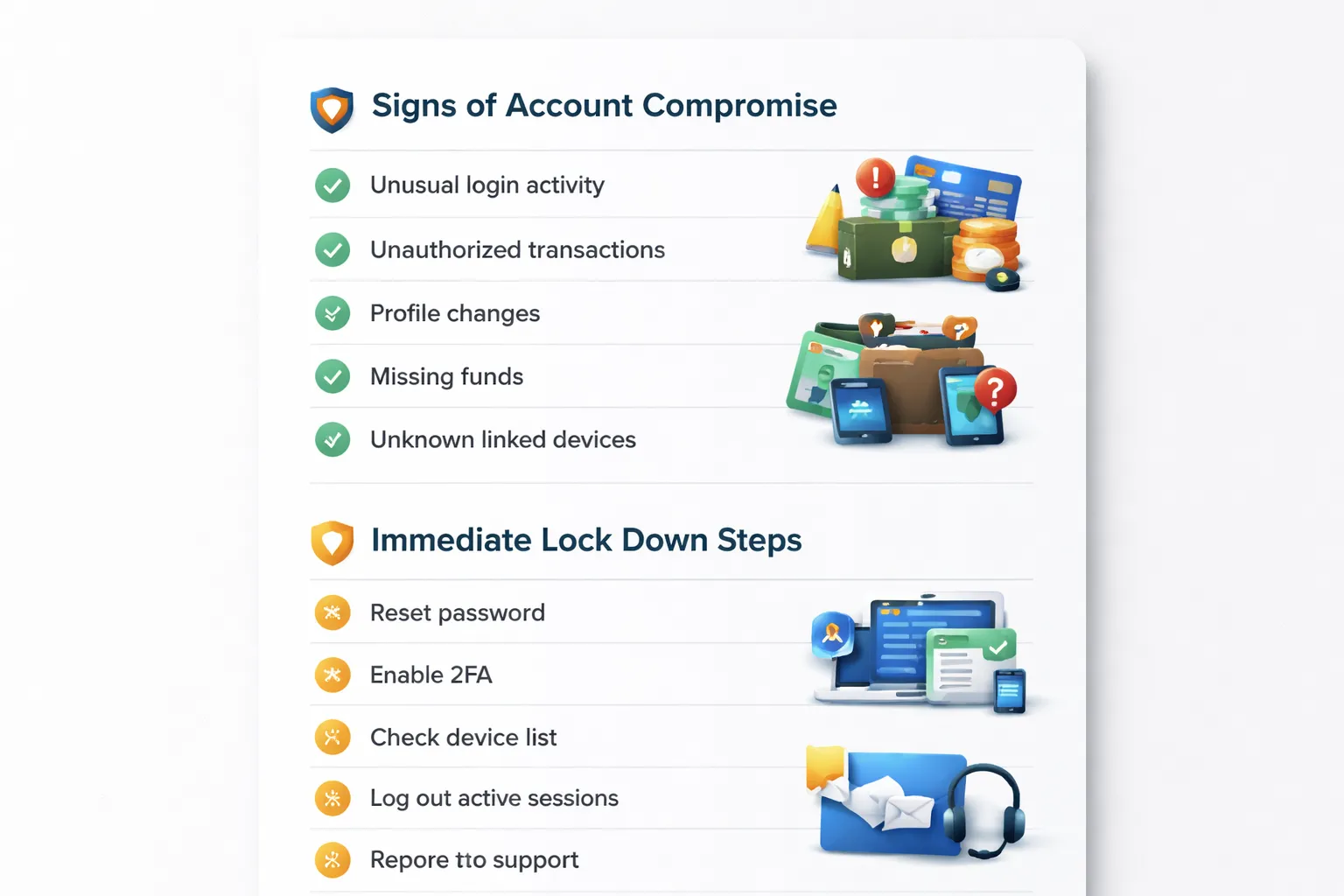
Security red flags that point to compromise
- Unexpected password reset emails. You did not request a reset, but you got a reset link or code.
- 2FA codes you did not request. You receive SMS or authenticator prompts while you are not logging in.
- Unfamiliar device or location alerts. The casino shows new devices, browsers, or countries in your login history.
- Changed account details. Your email, phone number, address, or preferred payment method changes.
- New withdrawals or pending cashouts. You see transactions you did not start, or your withdrawal address changes.
- Balance changes or bets you did not place. You see game history you do not recognize.
- Support messages you did not send. You find tickets or live chat logs you did not create.
- Login works but settings look different. Currency, limits, or security settings change without your action.
Immediate actions to lock your account down
- Stop using the same password everywhere. Create a new, unique password for the casino. Use 12 to 16+ characters with a mix of words and symbols.
- Reset your email password next. Your email controls password resets. Change it to a unique password. Enable 2FA on your email account.
- Enable 2FA on the casino account. Use an authenticator app if available. Store backup codes offline.
- Revoke active sessions. Use the casino security page to log out of all devices. If the casino does not offer it, ask support to invalidate all sessions.
- Remove untrusted payment options. Delete saved cards, e-wallet links, or crypto addresses you do not recognize.
- Check withdrawal settings. Look for changes to bank details, wallet addresses, or “preferred” methods. Screenshot the current state.
- Scan your device. Update your OS and browser. Run a malware scan. Remove unknown extensions.
- Freeze activity if you see fraud. Ask support to temporarily lock withdrawals until the review completes.
Report unauthorized access and speed up recovery
Use one support ticket. State that you suspect unauthorized access. Ask for a full security review, session invalidation, and a withdrawal hold.
Send evidence in a clean, organized list. Keep timestamps and match them to the casino time zone if possible.
- Account identifiers. Username, registered email, and approximate signup date.
- Proof of control. A photo of your ID if requested, plus a selfie or video check if the casino uses it.
- Timeline. When you last logged in successfully, when you noticed issues, and what changed.
- Transaction details. IDs for deposits, withdrawals, and charge references. Include amounts, dates, and payment method.
- Login evidence. Screenshots of device history, security alerts, reset emails, and 2FA prompts.
- Device and network info. Your usual device model, browser, OS version, and your typical country. Include any travel dates.
- What you already did. Password reset, email secured, 2FA enabled, sessions revoked.
If money moved without your approval, contact your payment provider fast and ask about dispute options and account security. Use the same facts and timestamps you gave the casino. For safer future transactions, follow online casino payment safety tips.
Step-by-step troubleshooting checklist (the complete online casino login problems fix)
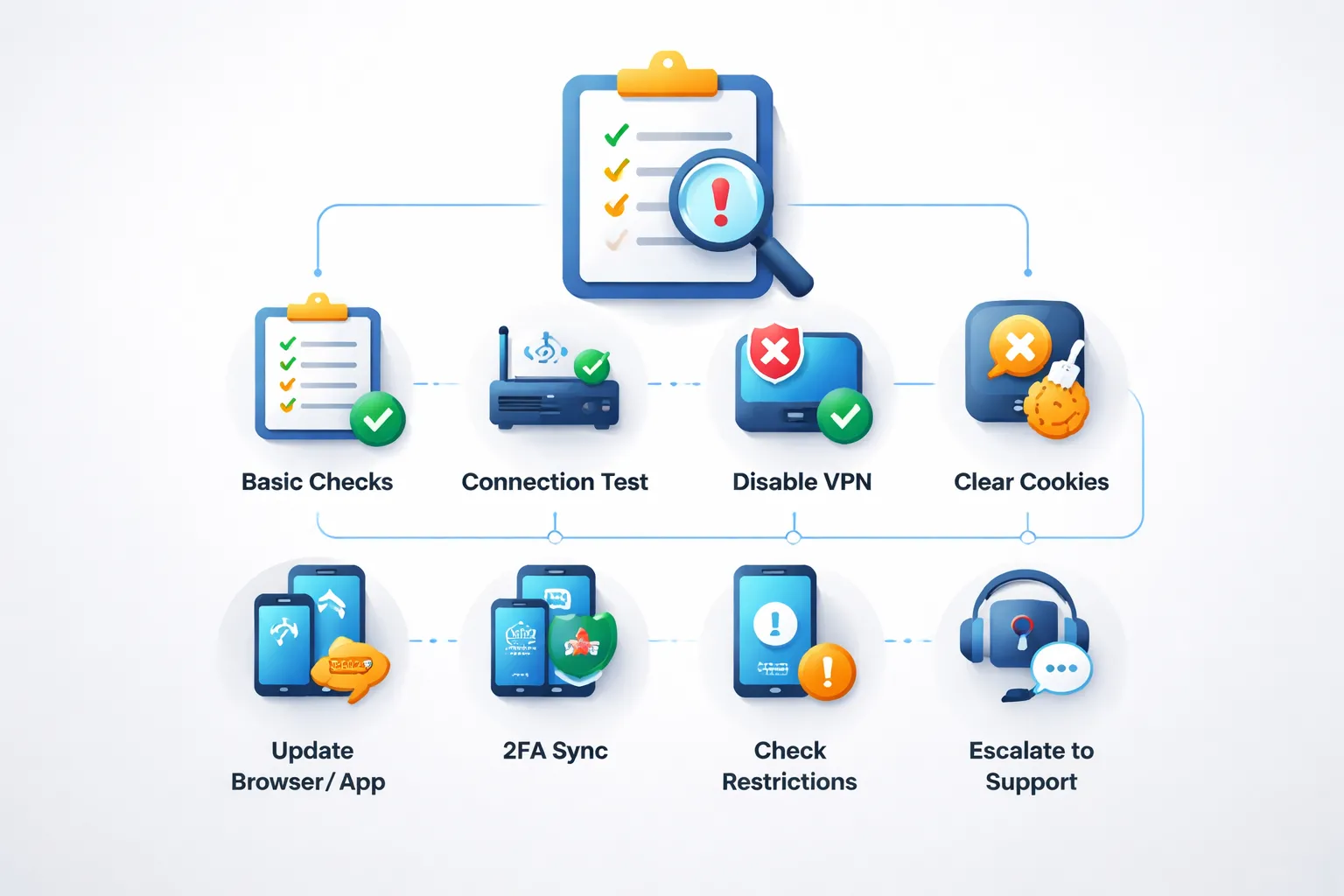
Triage flowchart, fix most login problems in under 10 minutes
- 0:00 to 0:30. Check the basics. Use the right site or app. Confirm you use the correct country version. Turn off caps lock. Re-type your email and password.
- 0:30 to 2:00. Check casino status and your connection. Switch between Wi-Fi and mobile data. Open the casino homepage in a private window. If the site will not load, it is a network or outage issue.
- 2:00 to 3:30. Disable VPN, proxy, and iCloud Private Relay. Casinos block many masked IPs. Try again with your normal connection.
- 3:30 to 5:00. Fix browser issues. Clear cookies and cache for the casino domain only. Disable ad blockers and script blockers for the login page. Update your browser.
- 5:00 to 6:30. Fix app issues. Force close the app. Update it. If needed, reinstall it. Do not sideload APKs.
- 6:30 to 8:00. Resolve credential and 2FA problems. Use password reset once. Check spam and “Promotions” folders. If 2FA codes fail, sync your phone time to automatic and try again.
- 8:00 to 9:30. Check account restrictions. Look for messages about KYC, self-exclusion, or suspicious activity. If you recently traveled or changed devices, expect extra checks.
- 9:30 to 10:00. Stop and escalate. If you see “account locked,” “too many attempts,” or “fraud,” stop retrying. Contact support with a clean record of what happened.
What to record before you contact support
- Exact error text. Copy it. If possible, save a screenshot.
- Timestamp. Include your time zone.
- Where it happened. Login page, app home screen, 2FA prompt, password reset screen.
- Device. Phone or desktop, brand and model.
- OS version. iOS, Android, Windows, macOS, and the version number.
- Browser or app version. Chrome, Safari, Firefox, or the casino app build.
- Network type. Wi-Fi or mobile data, plus your carrier if on mobile.
- IP and VPN status. Note if VPN, proxy, iCloud Private Relay, or corporate network was on.
- Location and travel dates. Country, and recent trips with dates.
- Actions you already took. Password reset attempts, 2FA reset, email security steps, sessions revoked.
Safe troubleshooting do’s and don’ts to avoid lockouts and fraud flags
- Do stop after 3 failed password attempts. Repeated tries can trigger a lock.
- Do use one device and one network while testing. Constant switching can look like account takeover.
- Do clear cookies for the casino domain only. Full clears can break saved 2FA sessions and settings.
- Do keep your details consistent. Use the same email, phone number, and name you used at signup.
- Do check your email account security first. A compromised inbox makes every casino reset unsafe.
- Do confirm you use the official URL and official app store listing. Typos and clones cause fake “login errors.”
- Don’t spam password resets. Casinos rate-limit these and may pause the account.
- Don’t use public Wi-Fi for login recovery. It increases risk and can trigger security checks.
- Don’t share one-time codes, screenshots of codes, or recovery links with anyone, including “support” on social media.
- Don’t create a new account to bypass a lock or verification. Many casinos treat this as a policy breach.
- Don’t try random VPN servers until one works. That pattern often triggers fraud systems.
If your login issue started after a deposit, withdrawal, or card change, use the same timestamps and payment references when you contact support. Keep your transaction method consistent until the issue gets resolved, and follow online casino payment safety tips for future logins and cashouts.
How to contact casino support efficiently (and get faster results)
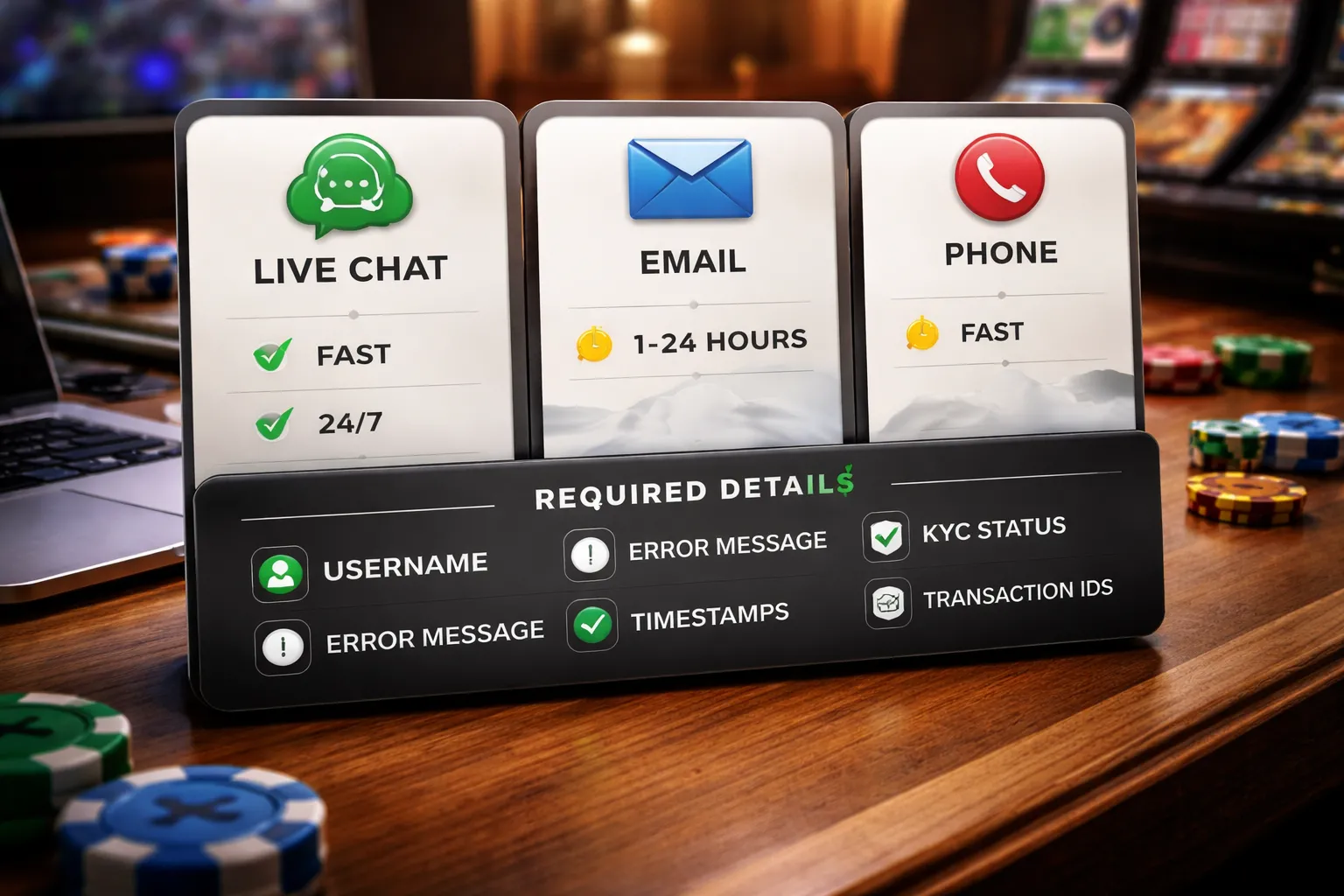
Pick the right support channel for your issue
Match the channel to the problem. You save time, and you avoid duplicate tickets.
- Live chat: Best for urgent access issues, 2FA resets, password resets, and simple account checks. Ask the agent to confirm the ticket ID in chat.
- Email: Best for KYC, document uploads, payment related blocks, and detailed error reports. You get a paper trail and can attach files.
- Phone: Best for account takeover risk, chargeback concerns, and time sensitive payment blocks. Use it when you need a supervisor fast.
If you can only use one channel, start with live chat for speed. Move to email if the case needs documents or logs.
Send a complete first message
Support moves faster when you provide the exact details they need. Use this checklist and paste it into your first message.
- Account details: Username, registered email, country, and casino brand name.
- Device and connection: Phone or desktop, OS version, browser or app version, and your network type, home Wi-Fi or mobile data.
- Error details: Exact error text, where it happens, login page, 2FA screen, or after clicking sign in.
- Timestamps: Time and date of the last failed login attempt, include your time zone.
- Last successful login: Approximate date, device used, and location if it changed.
- KYC status: Pending, approved, or rejected, include what documents you sent and when. If you are unsure, review the casino KYC verification process so you know what support will check.
- Payment history tied to the issue: Last deposit or withdrawal time, method used, transaction ID or reference, and amount.
- Account changes: New card, new phone number, new email, password reset attempts, or new 2FA app.
- Screenshots: One of the error, one of the URL bar or app screen header, and one that shows the time on your device.
What support usually checks on their side
- Failed login count and lock status.
- IP and location risk flags.
- 2FA and phone number match.
- KYC holds, document mismatch, or expired ID.
- Payment risk holds after deposits, withdrawals, or card changes.
- Responsible gambling limits or self-exclusion flags.
Expected timelines and how to escalate
| Issue type | Typical first reply | Typical fix time | Best next step if stuck |
|---|---|---|---|
| Wrong password, reset email not arriving | Minutes to a few hours | Same day | Ask chat to confirm your email on file and resend, then request the ticket ID |
| 2FA or SMS code problems | Minutes to a few hours | Same day to 48 hours | Request a 2FA reset, confirm phone number, and ask what proof they need |
| Account locked or restricted after risk checks | Within 24 hours | 1 to 3 days | Provide last login device, travel details, and payment references, ask for security review status |
| KYC or document review hold | Within 24 to 48 hours | 1 to 7 days | Ask what exact document failed, upload a new file, request manual review |
| Payment related login block | Within 24 hours | 1 to 5 days | Send transaction IDs, method, timestamps, and billing name match, ask for payments team escalation |
- After the first reply: Answer every question in one message. Do not drip feed details.
- If you get a template response: Reply with your ticket ID, restate the exact error, and list what you already tried.
- If nothing moves after 48 hours: Ask for escalation to the security team or payments team, based on the trigger.
- If support keeps closing your ticket: Open one new ticket, reference the old ticket IDs, and request a supervisor review.
- Keep your story consistent: Same device, same payment method, same location if possible, until the case closes.
Prevent future login problems: habits and settings that reduce risk
Password hygiene that stops lockouts
Most login failures start with reused or weak passwords. Fix that once, then stop repeating the cycle.
- Use a unique password for every casino. Reused credentials turn one leak into multiple account takeovers.
- Use a password manager. Generate 14 to 20+ character passwords. Let the manager fill them to avoid typos and wrong-case errors.
- Never reuse old passwords after a reset. Many casinos block “similar to previous” passwords and trigger extra checks.
- Do not store passwords in notes or screenshots. Those often sync to cloud backups and leak through shared devices.
- Keep your login email clean. If you use plus addressing, stick to one format. Example: name+casino@domain can fail if the site treats it as a different address.
Keep sessions stable to avoid security flags
Casinos score risk based on device, network, and location signals. Rapid changes look like account sharing or fraud.
- Use one trusted device for deposits and logins. New devices often trigger step-up verification or temporary blocks.
- Keep your network consistent. Switching between mobile data, public Wi-Fi, and home Wi-Fi can force repeated checks.
- Avoid frequent VPN changes. Rotating countries or IPs can cause geo blocks, failed 2FA delivery, and “suspicious login” holds.
- Do not open many sessions at once. Logging in on multiple tabs and devices can invalidate tokens and force re-authentication.
- Let the site set cookies. Blocking cookies or using strict privacy modes can break sign-in, captcha, and account verification loops.
Account hardening that reduces sign-in resets
Security settings can prevent takeovers and reduce forced password resets. Set them up before you have a problem.
- Enable 2FA in the strongest form available. App-based codes beat SMS when you travel or change SIMs.
- Save backup codes. Store them in your password manager or print them. Do not keep them in your photo gallery.
- Verify your email and phone. Unverified contacts cause failed recovery and delayed unlocks when support asks you to confirm identity.
- Turn on device lock. Use a PIN or biometrics. A stolen unlocked phone often leads to instant account access.
- Keep your OS and browser updated. Outdated builds trigger “unsupported browser” errors and break modern login flows.
- Review active sessions monthly. Log out unknown devices. Change your password if you see anything you do not recognize.
If you still get repeated locks after stable logins, check your account setup steps and verification details in how to create an online casino account.
FAQ
Why does my casino login keep failing even with the right password?
Check caps lock and keyboard language. Reset your password and log in once. Clear cookies for the casino site. Disable VPN and proxy. Try a different browser. If you use a password manager, re-save the entry and remove old autofill records.
Why am I locked out after a few attempts?
Most casinos lock accounts after 3 to 10 failed tries. Wait 15 to 60 minutes, then reset your password. Do not keep guessing. If you still lock out, contact support and ask for the lock timer and attempt limit.
I did a password reset but still cannot sign in. What now?
Use the newest reset email only. Old links fail. Copy and paste the reset URL into your browser. Check spam and promotions folders. If you use iCloud Private Relay, VPN, or an ad blocker, turn it off for the reset.
Why does the casino say my account is restricted or suspended?
Common triggers include incomplete verification, mismatched personal details, multiple accounts, chargebacks, or unusual login patterns. Stop trying random devices. Gather screenshots of the error, your username, and last login time. Then ask support for the exact restriction reason and steps.
Why does it keep asking for ID verification before I can log in or withdraw?
Many casinos enforce KYC before withdrawals or after risk checks. Upload clear photos, match your profile details, and avoid edits on documents. Use your real address and full legal name. Follow this guide to verify your identity at an online casino.
My 2FA code does not work. How do I fix it?
Sync your phone time to automatic. Generate a new code and enter it fast. Use the correct method, app code vs SMS. If you changed phones, use backup codes. If you lost them, request 2FA reset and expect extra ID checks.
The site loads but the login button does nothing. What should I do?
Disable browser extensions, especially ad blockers and script blockers. Clear site data for that domain. Update your browser. Turn off auto translate. Try incognito mode. If you use a corporate or school network, switch to mobile data.
Why does the casino say my browser is not supported?
Update your browser to the latest version. Enable JavaScript and cookies. Turn off compatibility mode. If you use an in-app browser from social apps, open the site in Chrome, Safari, or Firefox instead.
Can a VPN cause casino login problems?
Yes. Many casinos block VPN IP ranges or flag location changes. Turn off VPN, proxy, and iCloud Private Relay. Log in from your normal country and device. If you travel, contact support before logging in to avoid a security lock.
Why do I get “incorrect username” when I am sure it is right?
Casinos often treat email and username as different fields. Confirm which one the login form expects. Check for extra spaces. If you changed your email, use the new one. If you use Apple Hide My Email, try the relay address.
Conclusion
Most login problems come from four things, bad credentials, blocked cookies, outdated apps or browsers, or a security lock after unusual activity. Fix those first. Use a password reset, clear cookies, update your device, and turn off VPN or proxy.
- Store your login method. Note whether the casino uses email or username, and which social login you linked.
- Protect your account. Use a password manager and enable 2FA.
- Reduce security flags. Log in from your usual device and location, and avoid rapid retries.
- Escalate fast when needed. If you hit a lock, contact support and prepare to confirm your identity. Use identity verification to speed up the unlock.
Final tip, stop guessing after three failed attempts. Reset your password, verify the correct login field, then contact support with your account email, device, browser, and the exact error message.
-
Online Casino Payment Safety Tips: How to Deposit and Withdraw Securely
8 months ago -
What to Do If an Online Casino Won’t Pay Out: Step-by-Step Actions
8 months ago -
How to File a Complaint Against an Online Casino (Plus ADR Explained)
8 months ago -
How to Sign Up & Create an Online Casino Account (Step-by-Step)
8 months ago -
How to Withdraw Money from an Online Casino: Methods, Steps & Tips
8 months ago
-
- Why does my casino login keep failing even with the right password?
- Why am I locked out after a few attempts?
- I did a password reset but still cannot sign in. What now?
- Why does the casino say my account is restricted or suspended?
- Why does it keep asking for ID verification before I can log in or withdraw?
- My 2FA code does not work. How do I fix it?
- The site loads but the login button does nothing. What should I do?
- Why does the casino say my browser is not supported?
- Can a VPN cause casino login problems?
- Why do I get “incorrect username” when I am sure it is right?
-
-
- Why does my casino login keep failing even with the right password?
- Why am I locked out after a few attempts?
- I did a password reset but still cannot sign in. What now?
- Why does the casino say my account is restricted or suspended?
- Why does it keep asking for ID verification before I can log in or withdraw?
- My 2FA code does not work. How do I fix it?
- The site loads but the login button does nothing. What should I do?
- Why does the casino say my browser is not supported?
- Can a VPN cause casino login problems?
- Why do I get “incorrect username” when I am sure it is right?
-
-
Reload Bonus Explained: What It Is and When It’s Worth Claiming
6 months ago -
Online Casino Licensing Explained: Authorities, Licenses & How to Check One
8 months ago -
Best Live Dealer Casinos: Where to Play Live Blackjack, Roulette & More
8 months ago -
Best Online Casinos for High Rollers: VIP Perks, High Limits & Exclusive Bonuses
8 months ago -
Fast Payout Online Casinos: Best Sites for Quick Withdrawals
8 months ago
-
Online Casino Customer Support: What to Look For (Live Chat, Email, Response Times)
8 months ago -
Sign Up for an Online Casino: Create an Account in Minutes
8 months ago -
Online Casino Payment Safety Tips: How to Deposit and Withdraw Securely
8 months ago -
What to Do If an Online Casino Won’t Pay Out: Step-by-Step Actions
8 months ago -
How to File a Complaint Against an Online Casino (Plus ADR Explained)
8 months ago